
What should toolroom management software actually manage?
Most software sold to toolrooms keeps track of tools. The toolroom manager's real job is the work: what came in, what goes first, who has it, what is stuck, and when a repaired tool is safe to hand back to the press.
A toolroom manager starts the shift with a die down on press four, two preventive services falling due, a mould back from the outside repairer and a production supervisor asking when. Most software sold to toolrooms answers a different question. It knows where the tool is and what has been done to it, which matters, and the history of a die deserves a proper record. But the manager's job that morning is not looking things up. It is deciding what goes first, who takes it, what is stuck and when a tool is safe to go back to the press. Toolroom management software should manage that work, and the useful way to judge it is by how well it does.
A toolroom is a workshop with a queue
Work arrives in a toolroom from several directions at once. Breakdowns come off the press floor, usually urgent and usually loud. Preventive maintenance falls due on a produced-part count or a date. A strip-down turns up a cracked insert that becomes its own repair. A mould goes out for welding and comes back. A repaired die needs try-out time on a press that production also wants. All of it competes for the same handful of toolmakers. When that work lives in conversations, a whiteboard and somebody's memory, the request that gets done first is the one shouted loudest, and nobody can say afterwards why the PM on the high-volume die slipped a week.
Five things the software has to manage
- Intake. Every request becomes a job card against a specific tool, with its type and the person who raised it, so a breakdown, a PM finding and a try-out request each enter the same queue instead of arriving as a phone call.
- Priority. Each job carries an urgency that the whole toolroom can see, so when a critical breakdown displaces a routine repair, the displacement is visible and nobody discovers it on Friday.
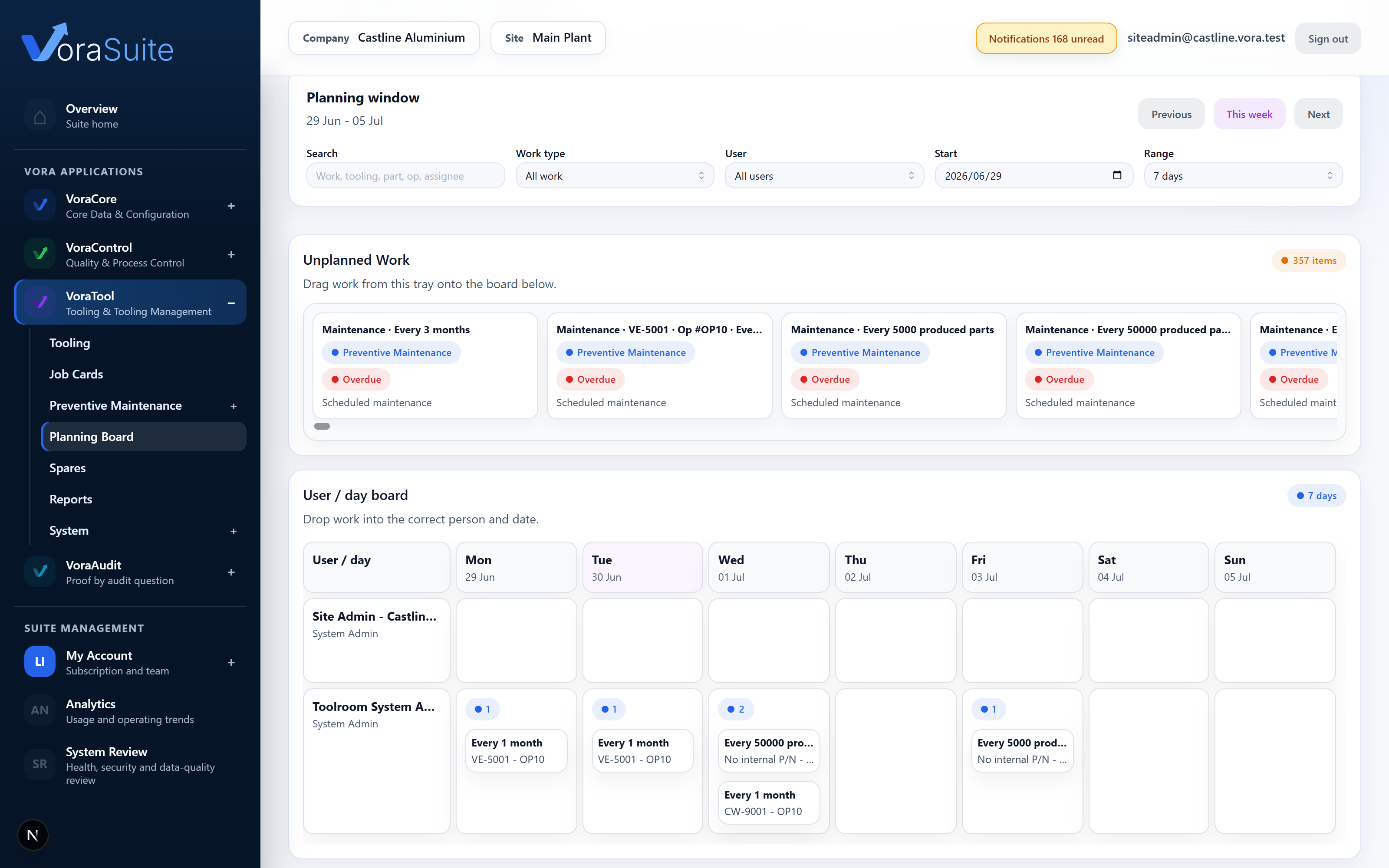
- Assignment. Each job has a named toolmaker and a planned day, which turns the week from one person's private plan into a board the team and production can both read.
- Waiting. A job held up for a spare, an outside repairer or press time is in a different state from a job nobody has started, and the record should say which one it is and why.
- Hand-back. A repaired tool is not finished when the toolmaker puts the spanner down. It goes to try-out, and someone decides whether it is released, sent back for more work or held.
The test most software fails is the hand-back
Plenty of maintenance systems close the work order the moment the repair is booked as done. In a toolroom that is the riskiest moment in the whole job, because a die that has just been welded, ground or re-timed has not yet made a good part. Toolroom software should hold the tool in the gap between repaired and released. It should show that the job is ready for try-out, record the release decision and who made it, and insist on a reason when the answer is no, whether the tool goes back for another try-out or into quarantine. A system without that gap lets a repaired tool drift back into production on the strength of a closed ticket, and the first anyone learns of it is a run of bad parts.
Plan the week from the records, not beside them
Most toolrooms already plan, usually on a whiteboard or a spreadsheet kept next to the real records. The trouble is that the plan and the records drift. A job closes and stays on the board, a PM falls due and never makes it on. The better arrangement is a planning board that draws directly on the job cards and the preventive maintenance events, shows what is overdue, what is due this week and what is coming in the next month, and lets the manager put each piece of work on a day for a named toolmaker. Then the plan is a view of the work rather than a second copy of it, and keeping it honest takes no extra effort.
Where VoraTool sits
VoraTool is toolroom software for production facilities that run moulds, dies and fixtures, in injection moulding, die casting and stamping. A job card is raised against the tool as a breakdown, repair, PM finding, try-out or external repair, carries a priority from low to critical, and moves from requested and approved through in progress to ready for try-out and awaiting release before it closes. Along the way it can sit at waiting or external repair, and everyone can see that it is. The repair records its root cause and corrective action, and the release decision is recorded too, including quarantine or a return to try-out, each of which needs a note. The planning board puts job cards and PM events on days for named toolmakers, grouped by overdue, due this week and due in the next thirty days. Toolmakers can work their own job cards from a floor kiosk that records labour and photos and keeps working through a dead wifi zone. The same records build the tool's history and feed VoraAudit when someone asks for it. VoraTool is not a facility CMMS and does not schedule production. It manages the toolroom.
Put the same five questions to any toolroom software. Does every request enter one queue against a specific tool? Can the whole toolroom see what is urgent and what it displaced? Is each job on a planned day for a named toolmaker? Does the record tell waiting apart from not started? And does a repaired tool have to pass a recorded release decision before it goes back to the press? Software that answers yes to all five is managing the toolroom. The rest are keeping a list of tools.
Tooling, job cards and preventive maintenance with the history written as the work happens.
Talk to someone who understands manufacturing control and audit evidence. We do not do generic demos.